Player ESP controls
Box
A 2D outline around each player. The quickest way to read position before you peek.
Skeleton
Lines along the player model showing pose: standing, crouched, turning. More useful than a box at close range.
Head Circle
A small mark on the head. Helps with manual aim when the aimbot is off.
Health Bar
Remaining health beside each player, for deciding whether to push or hold.
Distance
Meters to each player, for range calls and working out which threat is closest.
Name
The player name on the label, so a contact you already saw is not mistaken for a new one.
Team/Squad
Marks team and squad so your own side reads differently from everyone else on busy servers.
Weapon
The weapon the player is holding right now, such as a launcher or a sniper rifle. One line, not a full loadout.
View Direction
A line or wedge showing where the player is looking. The most useful label for timing a flank.
OOF Arrows
Arrows at the edge of the screen pointing at players outside your view. Part of ESP, not the radar.
Max Distance
Caps how far player labels draw. Players beyond it get no label, which keeps large maps readable.
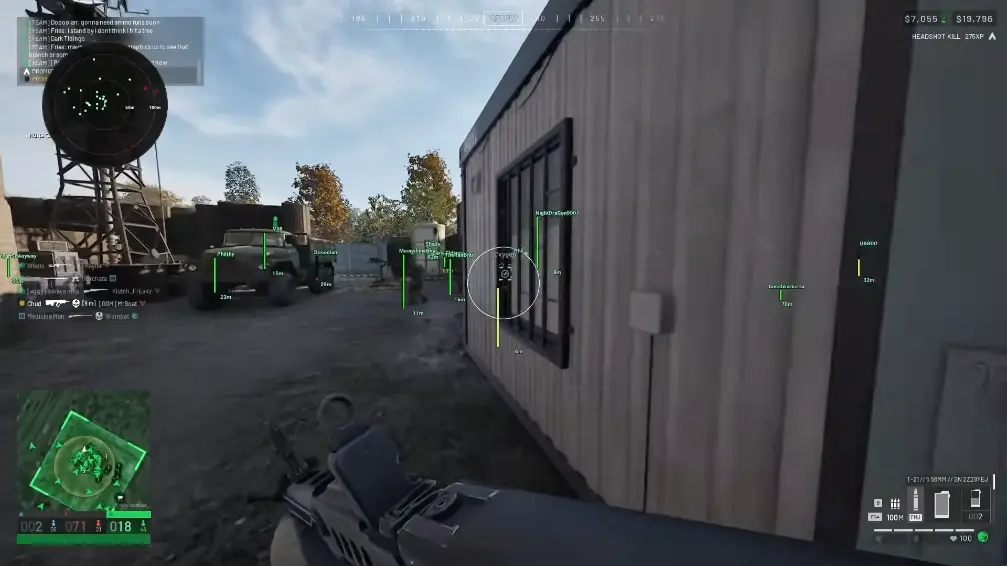
Eleven labels, not one wallhack switch
Wallhack is the search term. On this menu the visuals are split so you only turn on what you actually read. Box, skeleton, and head circle are three ways of drawing the body. Health, distance, name, team, weapon, and view direction are information labels. OOF arrows cover players off screen, and max distance limits all of it.
Because each label is its own toggle, two people on the same menu can have very different screens. That is the point. Every label on every player at once is hard to read in a fight.
Which labels to start with
Most setups start with box, distance, and health, plus team or squad on mixed servers. Add the skeleton when fights are close and pose matters more than position. Add weapon and view direction once you are planning pushes instead of reacting to them.
Set max distance to the range you actually fight at. Labels beyond it are the main source of clutter on big maps. The settings guide has profiles for infantry play and for low-clutter servers.
Player ESP and the radar are different screens
ESP draws on the main view. The radar is a separate 2D panel. OOF arrows and radar markers can both tell you someone is behind you, but only ESP gives that player a name, health, or weapon label. If a radar dot has no label, check max distance before assuming something is broken. The ESP vs radar post covers the split in more detail.
What player ESP does not include
There is no loot ESP and no item or crate labels. Vehicle class and occupancy belong to vehicle ESP, not to player labels. The overlay is streamproof, so a stream or recording of the game does not show the labels.
Works well with
Wardogs 2D Radar
2D radar controlsThe radar covers the area around you. ESP gives detail on whoever is in view.
Wardogs Vehicle ESP
Vehicle ESP controlsVehicle ESP tells you whether a hull is crewed. Player ESP labels the people.
Wardogs Aimbot
Aimbot controlsESP shows who is inside the FOV before the aimbot acts on them.
Related reading
Wardogs Player ESP questions
Is Wardogs player ESP the same as a wallhack?
Yes, that is the usual name for it. You get separate switches for box, skeleton, health, name, weapon, view direction, and the rest.
Does Wardogs ESP show loot or items?
No. It labels players. Vehicles have their own ESP. There is no loot list.
What does ESP max distance change?
How far player labels draw. Radar range is a different slider.
Player ESP ships with the full menu
One license covers every module. Monthly is $35 for 31 days. Lifetime is $150.
Around the site
Status, checkout, and the guides that sit around this module.