#1 CHEATS PROVIDER

Wardogs Cheats for PC

Player ESP, aimbot, and radar tools for Wardogs on Windows. Browse products below to compare modules and monthly or lifetime plans before checkout.

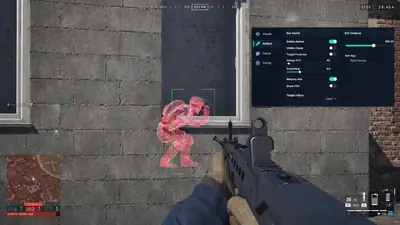
Wardogs first-person rifle view with an enemy outlined in red through a concrete wall, a head aim marker, compass, and minimap on screen.

Yes

Stream-proof

<24h

Patch speed

300+

Users

24/7

Live support

Player ESP
Item ESP
Radar Online
Aimbot Ready
Triggerbot
No Recoil
No Spread
Stream Proof
Full Bright
Team Check
Custom Crosshair
Config Save
24/7 Support
Instant Delivery
Live Status
Patch Tracking
FOV Controls
Auto Updates
Windows 10 & 11
Wardogs
anti-cheat client
Auto updater
Config cloud sync
HWID reset
External loader
Player ESP
Item ESP
Radar Online
Aimbot Ready
Triggerbot
No Recoil
No Spread
Stream Proof
Full Bright
Team Check
Custom Crosshair
Config Save
24/7 Support
Instant Delivery
Live Status
Patch Tracking
FOV Controls
Auto Updates
Windows 10 & 11
Wardogs
anti-cheat client
Auto updater
Config cloud sync
HWID reset
External loader

Features

Everything you need in one package

Aim assists, player and item ESP, radar, and weapon handling options for Wardogs, maintained after patches.

Player ESP

Read the firefight.

2D boxes, names, distance, weapon info, and KDA lines help you track pushes without tabbing out.

  • Snaplines and proximity alerts
  • Bot ESP and team check filters
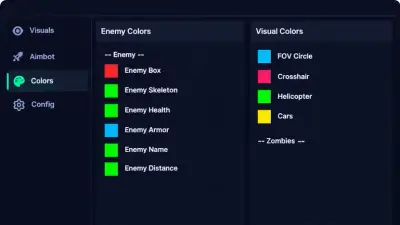
  • Custom color presets per layer
  • Max distance caps in menu
  • Weapon and KDA readouts

Item ESP

Loot awareness.

Item ESP highlights pickups and gear on the map with distance controls so you route safely.

  • Item labels and distance readouts
  • Maximum ESP distance slider
  • Toggle sets per game mode
  • Pairs with radar overlays

Aimbot

Tuned aim assists.

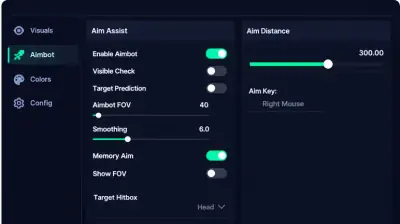
Aimbot, aimlock, memory aim, and prediction settings share FOV, hitbox, and smoothing controls.

  • Custom aim keys and hitbox pick
  • Visibility checks and switch delay
  • Controller-compatible assists
  • Aiming indicators in menu

No Recoil

Steadier bursts.

No recoil and no spread options are designed to steady listed weapons when the menu exposes them.

  • Separate toggles per weapon class
  • Strength sliders with caps
  • Save handling presets to cloud
  • Pair with aim FOV limits

Radar

Nearby activity.

Radar view is designed to show nearby movement so you can rotate before a flank closes in.

  • Activity blips around your position
  • Opacity and scale controls
  • Works beside ESP color layers
  • Toggle without closing menu

Trigger Bot

Fire when aligned.

Optional triggerbot fires when your crosshair meets a valid target, with delay and key gates.

  • Delay and hold-time tuning
  • Team check aware firing
  • Toggle separate from aimbot
  • Conservative defaults in portal

Stream Proof

Built for creators.

Stream-proof modes are designed to keep overlays on your monitor while capture software records a clean feed.

  • OBS and Game Bar capture modes
  • Toggle stream proof per module
  • Test checklist in portal docs

Visual toggles

Clarity and HUD.

Full bright, custom crosshair, disable flash, zoom level, and FPS or VSync options sit in the misc tab.

  • Full bright for dark maps
  • Custom crosshair shapes
  • Disable flash where listed
  • Zoom level and HUD readouts

Cloud Config & Updates

Patch day ready.

Save, load, and organize configs in the menu; portal delivery tracks Wardogs and anti-cheat patch days.

  • Cloud backup for profiles
  • Loader push within hours of patches
  • Status banner for build notes

Store

Our products

Every product has its own page with features, requirements and checkout.

Why us

Wardogs tooling backed by patches, not promises

Many cheat shops ship stale loaders, loud rage presets, and ticket bots. cheatsforwardogs.com focuses on patch-day loader builds, readable ESP defaults, and live operators.

  • Patch-day loader updates

    Anti-cheat-aware builds pushed within hours of Wardogs updates; check the live status banner before you queue.

  • Humanized aim & ESP defaults

    FOV caps, smoothing and distance filters ship conservative in the portal so overlays stay readable, not wall-of-box rage modes.

  • Live operators

    Real engineers for loader setup, ESP configs and HWID resets: 24/7 shift coverage, not copy-paste FAQ tickets.

  • External loader + stream proof

    Overlay suite with OBS capture modes, no risky DLL injection into the Wardogs process like legacy providers still sell.

  • Cloud preset sync

    Per-mode profiles backup to the portal, same sliders on any PC without rebuilding from scratch.

  • HWID reset & license moves

    HWID clears and machine transfers handled through support, most providers lock one rig or charge for every swap.

<24h

Patch turnaround

Average time to ship a loader build after major Wardogs or anti-cheat changes.

24/7

Operator support

Engineers on shift for setup, configs and account issues.

300+

Active operators

Windows players running ESP, aimbot and utilities on cheatsforwardogs.com.

Setup guide

From checkout to your first match in just three simple steps

Getting started is easy. Follow the operator portal flow to download the loader, load presets, and launch Wardogs on Windows.

  1. Unlock portal & download loader

  2. Launch & configure modules

  3. Verify status & launch Wardogs

How it works

From status check to saved profile.

A straight path from status check to a saved config you can reuse every session.

4 easy steps

  1. 01

    Check live status

    Read the live banner on cheatsforwardogs.com before you buy or launch.

  2. 02

    Choose your product

    Pick the cheat suite or a hardware utility, whichever matches bans, rigs, or account resets you face.

  3. 03

    Launch & configure

    Download from the portal, enable modules, and tune ESP and aim sliders offline first.

  4. 04

    Save your profile

    When settings feel right, save mode presets to the cloud for the next session.

Blog

Guides and updates

ESP and aimbot setup, menu tuning and patch-day checks for Wardogs.

Most cheat problems come from a short list of causes. Work through them in order before you contact support.

A skin changer is about looks, not gameplay power. Here is a clear explanation and what to check before you buy.

An HWID ban targets your hardware, not just your account. Here is what that means and where an HWID spoofer fits.

FAQ

Questions about this page

Answers tied to what you are reading. Visit the FAQ page for every topic.