
Wardogs Hacks for Windows
Configure aiming assists, player ESP, and radar from one menu. Confirm compatibility on cheatsforwardogs.com before you launch Wardogs.
Product Overview
At a glance
Key capabilities
What Wardogs Cheats focuses on before you open the full module list.
Plus 21 additional modules in the operator portal. See the full list below.
Overview
Wardogs cheat suite on Windows
How modules, presets, and patch-day status checks fit Wardogs survival workflows.
Wardogs Cheats advertises aiming assistance, player visibility enhancements, radar, and gameplay customization in a menu-based interface.
Advertised for Windows 10 or 11 PCs using Intel or AMD processors, with borderless or windowed display modes and compatibility listed for Steam, Battle.net, and Xbox Game Pass. Monthly ($35, 31 days) and lifetime ($150) plans are listed at checkout. Verify compatibility on cheatsforwardogs.com before purchase or launch.
Advertised modules include aimbot, aimlock, memory aimbot, aim prediction, triggerbot, player ESP, item ESP, radar, no recoil, no spread, full bright, and custom crosshair options in a menu-based interface.
Configuration and support
The menu supports saving, loading, and organizing settings, with language customization and other interface options listed by the provider. Setup information is provided to help configure the software; update timing and feature availability may vary.
Plans and delivery
Choose monthly ($35 for 31 days) or lifetime ($150) at checkout. Digital delivery and loader access are provided after purchase. Check the live status banner before every session.
Updates and compatibility
The provider advertises compatibility maintenance following game updates. Actual compatibility may depend on the current game build and product version; verify before launch.
Modules
What's included
Every module and overlay shipped with Wardogs Cheats, toggle and tune in the operator portal.
- Aimbot
- Aimlock
- Memory aimbot
- Aim prediction
- Triggerbot
- Customizable aim keys, FOV, hitbox, distance, visibility checks
- Target-switch delays and aiming indicators
- Controller-compatible aiming assistance
- Player ESP: 2D boxes, names, distance, weapon info, KDA
- Snaplines, proximity alerts, bot ESP, customizable ESP colors
- Item ESP and maximum ESP distance
- Radar
- No recoil and no spread options
- Full bright
- Custom crosshair
- Disable flash option
- Team check
- Show FPS and VSync settings
- Zoom level adjustment
- Save, load, and organize configs in the menu
- Language customization (menu)
- Windows 10 or 11 (Intel or AMD)
- Borderless or windowed mode
- Steam, Battle.net, Xbox Game Pass compatibility (varies by build)
Experience
Menu layers · After checkout
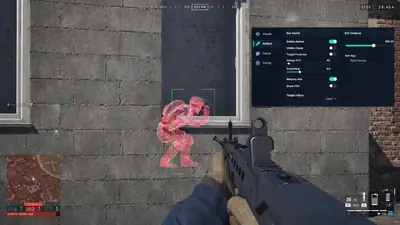
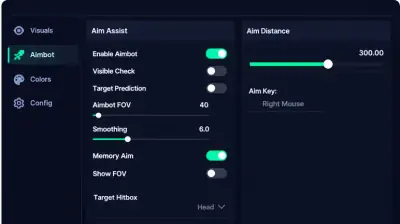
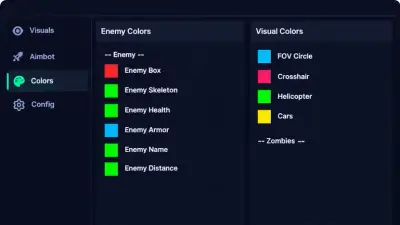
Screenshots above show the Wardogs menu layout; below is what each module group does and how portal access works after purchase.
In-game layers
- Layer A
ESP through cover
Player ESP chams and aim markers while the aimbot tab stays open in a live match.
- Layer B
Aimbot controls
Toggle aim assistance, set FOV and smoothing, and pick a target hitbox from the sidebar menu.
- Layer C
ESP color presets
Assign colors for enemy overlays, crosshair, FOV ring, and world object highlights.
More products
Pairs well with
Other tools from the same store, each with its own page and checkout.
- HWID Spoofer From $50 Refreshes disk serials, MAC addresses, GPU IDs, and related fingerprints after a hardware flag, with trace cleanup in the same license. View details
- UGC From $35 Unban & Governance Control (UGC) ships template appeals and automated dispute filings for limited logins across platforms. View details
- Skin Changer From $35 Small client that paints premium weapon skins, outfits, and knife variants on your screen across major titles. View details
FAQ
Questions about this page
Answers tied to what you are reading. Visit the FAQ page for every topic.
Blog
Related guides
Filter by topic to find setup guides, feature deep-dives, and patch-day notes.
Thinking about buying Wardogs cheats? Here is a plain checklist of the features, support and warning signs that actually matter.
Good settings make a cheat feel natural. Here is how to approach aimbot, recoil and spread options, and how to save what works.
ESP and radar change how much you know about a match. Here is what each tool shows and how to get value from it.
No cheat is risk free. Here is an honest overview of ban risk, what a streamproof overlay does, and habits that help.
Most cheat problems come from a short list of causes. Work through them in order before you contact support.
An HWID ban targets your hardware, not just your account. Here is what that means and where an HWID spoofer fits.
Wardogs community forum
Read discussion
Archived, read-only threads on loader setup, ESP configs, patch status, and HWID bans. Replies are closed.
- Features & Questions WARDOGS ESP vs radar: what is the actual difference? ESP and radar often appear next to each other in cheat feature lists, but the descriptions can be confusing. Here's a discussion about what those labels generally mean and what buyers should verify.
- Features & Questions WARDOGS aimbot settings explained: FOV, prediction, and target checks FOV, prediction, target checks, and hitbox options can be difficult to compare across listings. This thread breaks down the terminology and highlights what a feature description should clarify.
- Buying Advice What should you check before buying a WARDOGS cheat? A feature list alone doesn't tell you everything about a software purchase. Compare compatibility information, documented features, support terms, update policies, and account risks before making a decision.
- Features & Questions WARDOGS ESP or aimbot: how do these feature categories differ? ESP and aimbot features are often listed together, but they describe different categories of functionality. Discuss the terminology and how to evaluate a product description without assuming every feature is included.